Budgets that warn you at the percentage you pick
Give a category a monthly limit and pick when you want a warning: at 80% of it by default, or at any 5% step from 50% to 100%. After your spending reaches that point, Sorayli emails you, and sends a push to your iPhone if you turn on push notifications. Charges you mark as recurring add up to one monthly total for your subscriptions. Sorayli does not link to your bank, so it counts only what you add or scan.
9:41

Budget exceeded
now"Entertainment" is over budget — 118% spent.
Budget alert
2d ago"Food & Dining" reached 85% of its budget.
Sorayli
to you
85% of Food & Dining used
Spent this month
$512.40
Limit
$600
Left
$87.60
The alerts are illustrations with the example month below: the figures are samples, while the push and email wording is what Sorayli sends.
How a budget works
- A limit
- The most you want to spend, in your base currency.
- One category or all
- Pick a category, such as Food & Dining, or All categories to cap everything you spend.
- A period
- Monthly unless you change it. Weekly budgets run Monday to Sunday, and yearly ones January to December. For now, only monthly budgets get alerts you can rely on; the alerts section says why.
- What counts
- Expenses dated in the current period and filed under that exact category. Ones you type in and ones you scan from a receipt both count. Income does not, and a budget on a parent category does not include its subcategories.
- Spent so far
- The total of those expenses. It starts from zero each period, and unspent money does not roll over. A monthly budget you create on the 20th still counts what you spent from the 1st.
- What you see
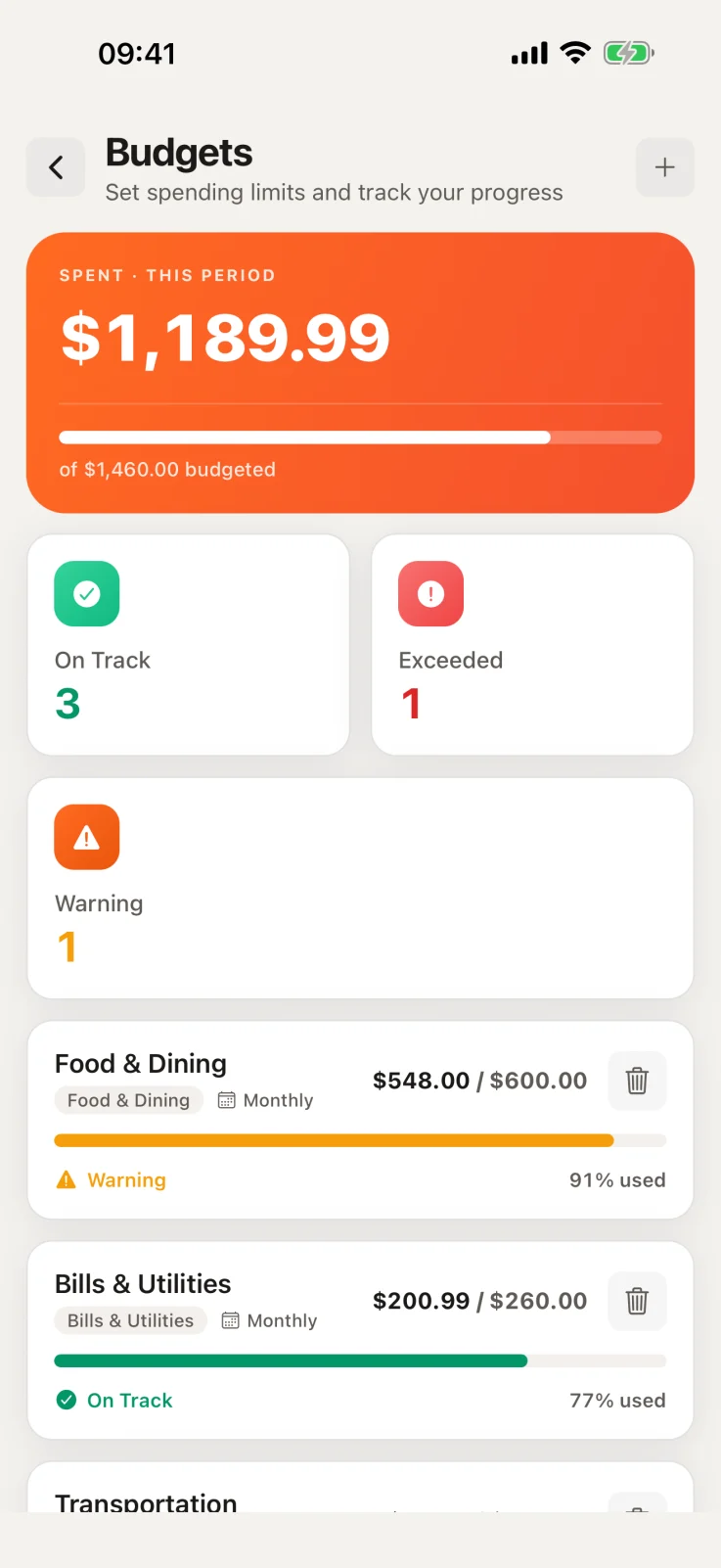
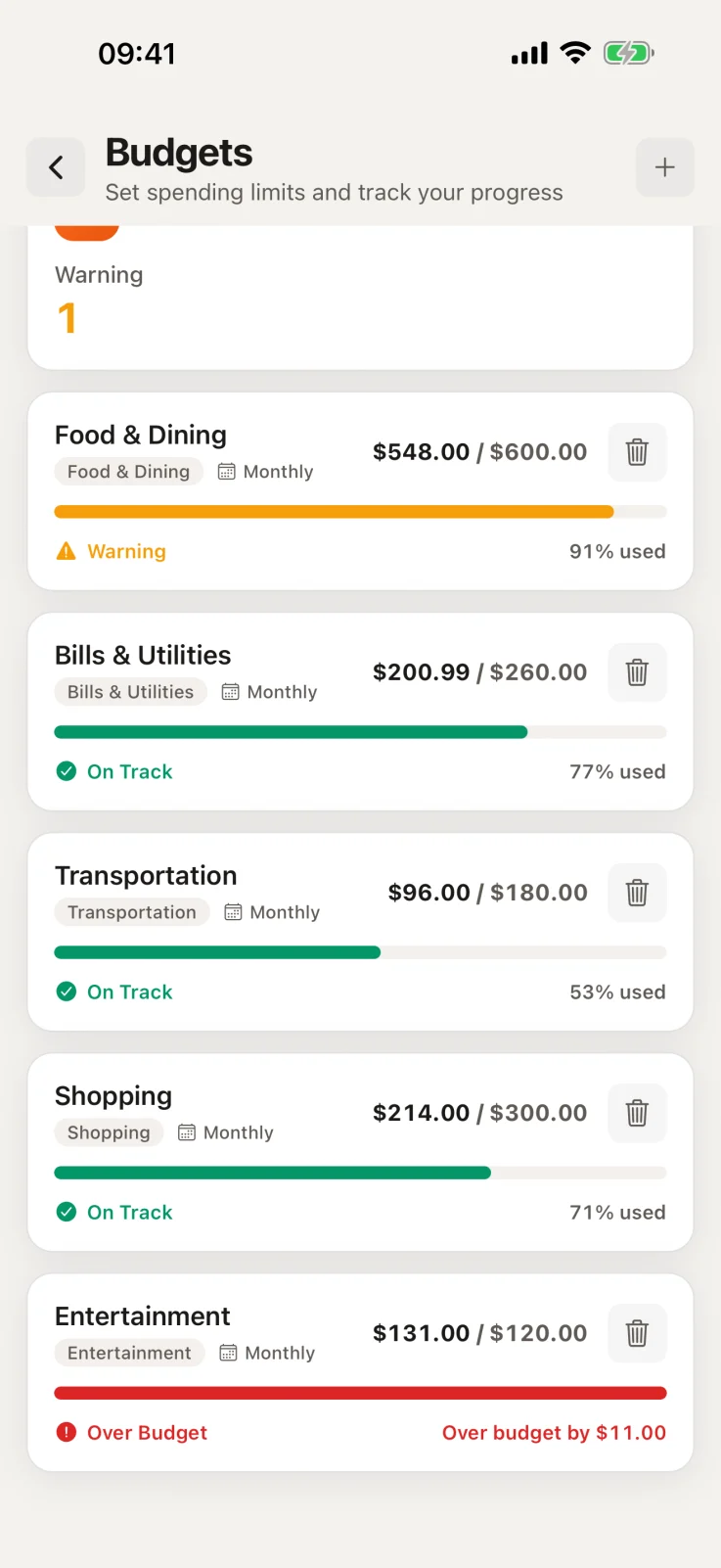
- The amount spent, a percentage and a bar, marked On Track, Warning from your alert threshold, or Over Budget from 100%. The Budgets screens on the web and in the iPhone app read the same calculation, so they show the same figure.
- On the Free plan
- Up to 2 budgets at a time. Creating another is refused: the web app offers an upgrade, and deleting a budget frees its place. Budgets you already have are never removed. Pro and Family have no budget limit.
Spending alerts: when Sorayli warns you
Alerts are for monthly budgets. Weekly and yearly budgets are tracked in the app, but their alerts are measured over the calendar month for now, so they can arrive early or late. If you want a warning you can rely on, make the budget monthly.
- Alert threshold
- The share of the limit that brings the first alert. You set it for each budget, from 50% to 100% in steps of 5%, and it starts at 80%.
- Two alert levels
- A Budget alert when spending reaches your alert threshold, then Budget exceeded when it reaches 100%. If one check finds both already reached, or your threshold is 100%, you get only Budget exceeded.
- Email and push
- Alert emails are on from the start. Pushes to your iPhone begin once you switch on Push notifications in the app's settings, and tapping one opens Budgets. There are no browser notifications.
- What the email shows
- A subject such as “85% of Food & Dining used” or “Over budget: Entertainment” names the budget. Inside: what you have spent this month, the limit, what is left or how far over you are, a progress bar and the month's dates.
- When it arrives
- Budget alerts come from a scheduled check on Sorayli's server, not from saving an expense. An expense that takes a budget to its alert threshold is picked up at the next check after you save it, so the alert arrives after the purchase, not with it.
- How often
- At most one Budget alert email and one Budget exceeded email per budget each month. A push can come again after you change your base currency, or when spending drops back under your alert threshold, say because you raised the limit, and then reaches it again.
- Every plan
- Budget alerts come with Free, Pro and Family.
Example: three monthly budgets on the 24th
| Budget | Limit | Alert at | Spent so far | Alerts sent |
|---|---|---|---|---|
| Food & Dining | $600 | 80% | $512.4085%, Warning | Budget alert |
| Entertainment | $200 | 90% | $236.50118%, Over Budget | Budget alert, then Budget exceeded |
| Transportation | $150 | 80% | $96.0064%, On Track | None yet |
- Food & Dining reached $480, its 80% threshold, and the next check sent a Budget alert. The first check after it reaches $600 will send Budget exceeded.
- Entertainment reached $180 before one check and $200 before a later one, so it sent both alerts. Had it gone from under $180 to over $200 between two checks, you would have had only Budget exceeded.
- Transportation is at 64% and has sent nothing. The first check after it reaches $120 will send a Budget alert.
Subscription tracking: only the charges you mark
Sorayli does not pick out subscriptions on its own. A charge counts as recurring only when you mark it: Make recurring on a transaction on the web, or the Repeats switch when you add or edit one in the iPhone app. Then pick how often it bills: weekly, every two weeks, monthly or yearly. More in the guide to tracking expenses without linking your bank.
- Your totals
- Each subscription becomes a monthly cost at its own billing cycle, so a yearly plan adds a twelfth of its price. Totals are in your base currency. Charges with the same name count as one subscription, so a gym you log every month counts once. Two different subscriptions with the same name merge too, so give them different names. Paused and cancelled ones add nothing.
- On the web
- The Subscriptions page, on every plan, shows four figures: Per month, Per year, Active Subscriptions and Next 30 days. Each subscription has a button to pause or resume it. Next 30 days counts only charges whose saved next billing date falls in that window. Only the iPhone app asks for that date, and a date that has passed is not moved forward.
- On iPhone
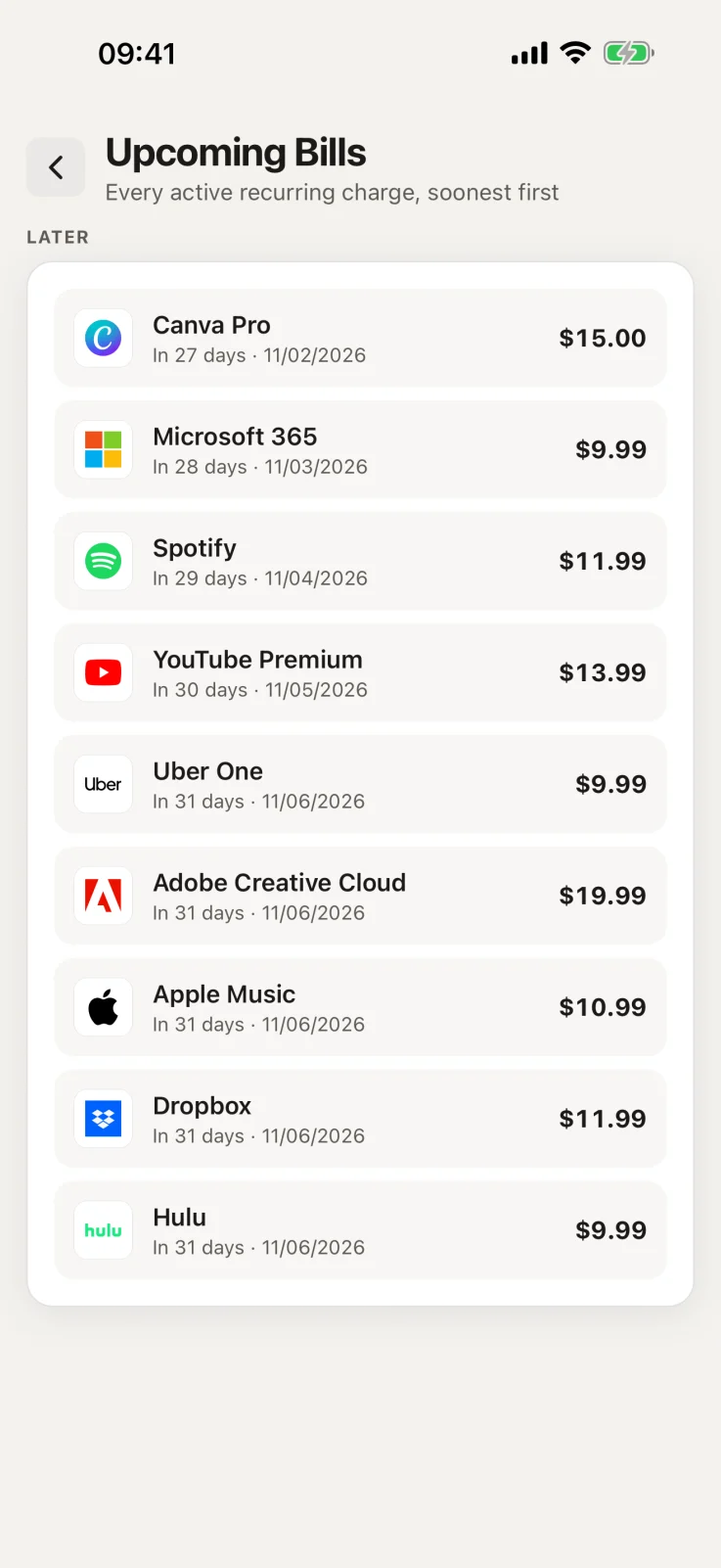
- There is no Subscriptions screen. Upcoming Bills lists active recurring charges whose saved next billing date is today or later, soonest first, and the home screen shows up to five due in the next 14 days. A charge with no date, or one whose date has passed, is not listed.
- Renewal reminders
- An email listing the subscriptions that renew in the next 3 days, with each date and amount and a total. It is on by default and on every plan, and there is no push version. It uses your saved next billing date, moved forward if it has passed, or else your last charge plus its billing cycle.
- Insights, on Pro and Family
- Flags a subscription whose latest charge is at least 5% above the one before, one with no charge logged for two billing cycles (which also happens if you stop logging it), and the same service billed under two plans.
- Not included
- Marking a charge recurring does not add next month's charge to your records, so you log each one. Sorayli never cancels anything: cancelling happens with the company that bills you. Pausing a subscription in Sorayli takes it out of your totals, renewal reminders, Next 30 days and Upcoming Bills, and does not stop the company billing you.
Example: five subscriptions, one monthly total
Sorayli
to you
2 subscriptions renew soon
Renewing in the next 3 days
Video streaming
$15.49
Music streaming
$10.99
Total
$26.48
| Subscription | Billed | Price | Per month |
|---|---|---|---|
| Video streaming | Monthly | $15.49 | $15.49 |
| Music streaming | Monthly | $10.99 | $10.99 |
| Cloud storage | Yearly | $23.88 | $1.99 |
| Gym membership | Yearly | $360.00 | $30.00 |
| Language app | Monthly, paused | $12.99 | Not counted |
| Per month | $58.47 | ||
| Per year | $701.64 | ||
Cloud storage costs $23.88 a year, so it adds $1.99 a month. The paused language app stays on the list but adds nothing.
What it costs
Budgets, budget alerts, the Subscriptions page and renewal reminders come with every plan. Free keeps up to 2 budgets at a time. Pro and Family have no budget limit, and add Insights.
Compare plansWhere it works
On the web and in the iPhone app. Push alerts need the iPhone app; email reaches you either way. The Subscriptions page is on the web, and the iPhone app has Upcoming Bills instead.
What it does not do
Sorayli does not connect to your bank, so a budget counts only the expenses you record. It does not find subscriptions or cancel them, and budget alerts come from a scheduled check, not at the moment you pay.
04 · FAQ
Questions about budgets and subscriptions
Open any question for the full answer.
Ready to try it?
Free, no card, no bank login.
Does a purchase in another currency count toward a budget?
Yes, at its value in your base currency. When you save it, Sorayli uses the rate it has on file for the purchase date, or the most recent earlier one if it is no more than 7 days older. Otherwise it fetches a rate for that date from a public exchange-rate feed. It keeps the converted amount, so a later move in the rate does not change what you spent. More on how multi-currency tracking works.